The Rocky Mountain Athletic Conference Launches The RMAC Network App on Roku

COLORADO SPRINGS, Colo. – The Rocky Mountain Athletic Conference (RMAC), in partnership with Stretch Internet, continues to expand its coverage of conference events by announcing the development of the RMAC Network app for the Roku platform. The app is available on Roku devices, which features live and on-demand coverage from throughout the conference, including this weekend’s RMAC Men’s and Women’s Basketball Tournament.
As the conference’s streaming provider, Stretch Internet has collaborated with Roku to provide an alternative way to access all RMAC contests. Viewers can download the app for free by following the instructions below.
"We pleased to provide this expanded platform to RMAC fans and another venue to showcase our premiere student-athletes," stated RMAC Commissioner Chris Graham.
Roku is a streaming platform that delivers a best-in-class user experience. It provides a large variety of apps including, but not limited to, Hulu, Netflix, YouTube, HBO GO, ESPN and Pandora. At the end of 2016, Roku had more than 13 million monthly active accounts which streamed in the last 30 days. Roku customers streamed over nine billion hours of video and music, nearly doubling the number of hours from 2015.
The RMAC is only the second Division II conference out of Stretch Internet clients, to release the Roku app and is the third conference in all of Division II with an app of its kind.
“We’re very excited to launch a Roku app for the RMAC,” said Stretch Internet President & CEO Ryan Ermeling. “This is without a doubt one of the premier conferences in the D-II ranks and it’s important for their fans to have more integrated viewing options. Today marks a big first step in that direction, and we’re excited for other RMAC announcements in the near future.”
How can I download the RMAC Network app on my Roku?
The RMAC Network app can be downloaded by signing into your account either on your Roku device or online via the Roku Channel Store. (If you don’t have a Roku account, sign up for free at
www.Roku.com)
On your Roku device:
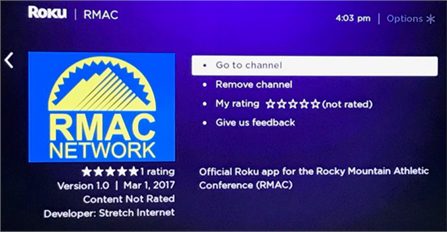
On the main menu, go to search and type in RMAC. Select RMAC Network to add to your channel list.
 On your computer:
Go to
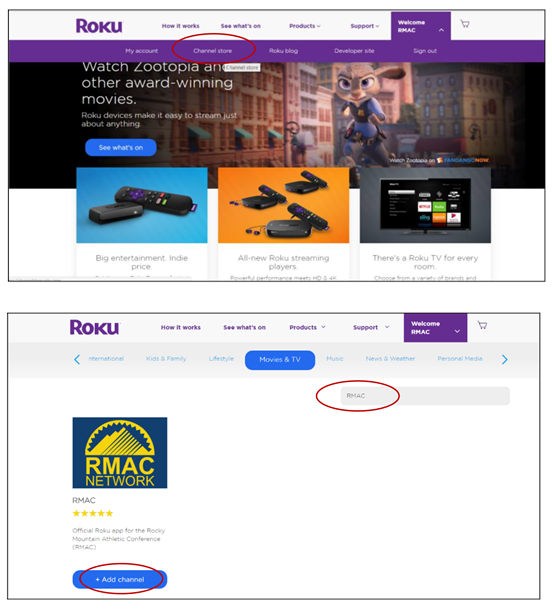
www.Roku.com, enter the Roku Channel Store and search for RMAC. Click Add Channel to install the app.
For a direct link to the RMAC Network app:
Click Here
Where can I purchase a Roku device?
Roku offers several different devices to fit the needs of every consumer. You can explore a list and compare products by
clicking here. Certain models can be found in select stores such as Best Buy, Walmart, Target, and Amazon.